
IFRS 9 Excel Add-In Solutions
Automate the complete Expected Credit Loss process—from data preparation and model calculations to forward-looking scenarios, reporting and audit trails.
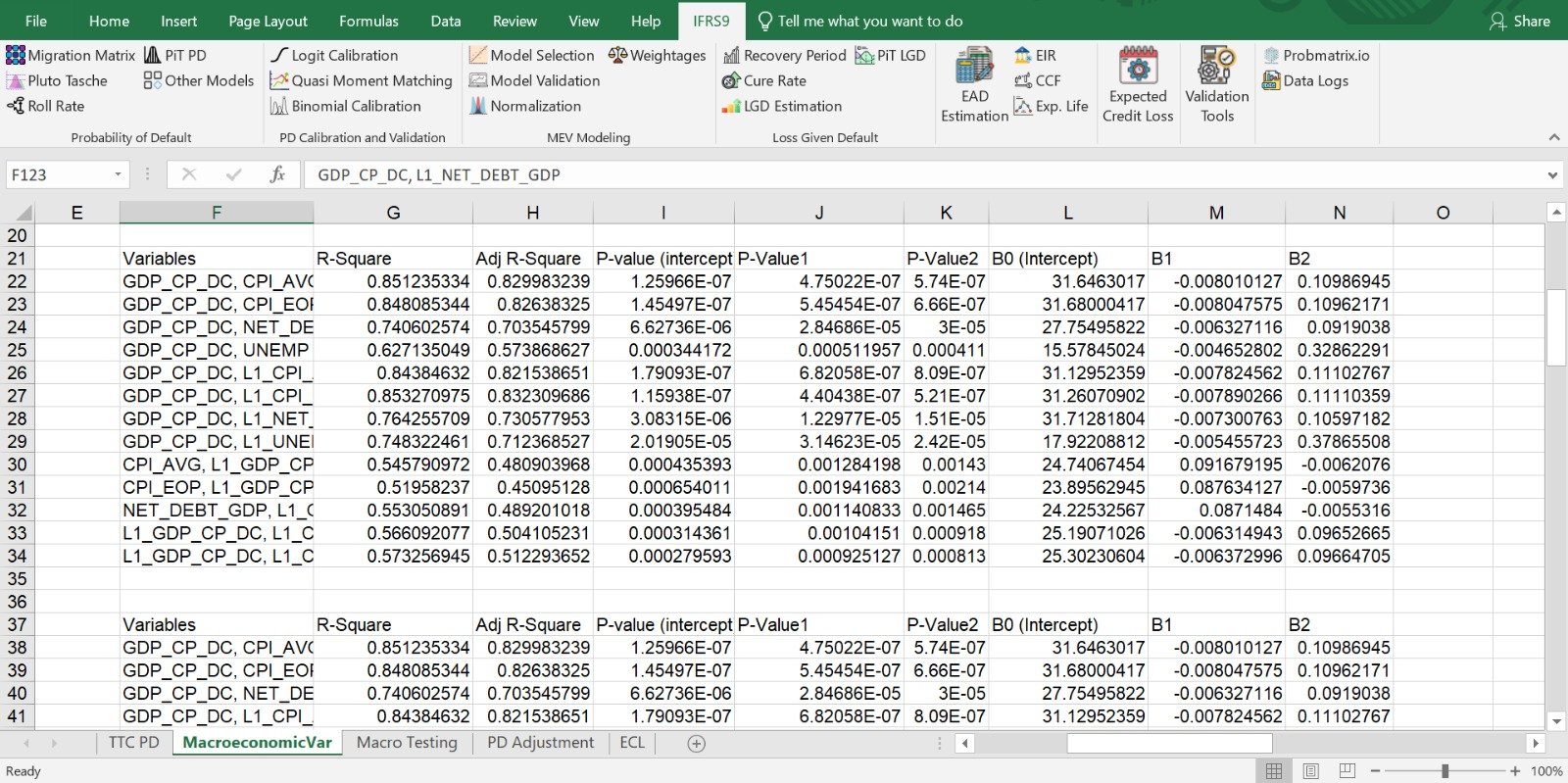
Familiar Excel Interface. Enterprise-Grade ECL Engine.
A familiar Excel interface powered by a controlled calculation engine for advanced IFRS 9 modelling, automated ECL processing and review-ready results.

IFRS 9 Add-In Estimation Workflow
Integrated. Intelligent. Compliant. — data flows live through the engine below.
PD Inputs
- • Historical Data
- • Behavioral Data
- • macroeconomic data
LGD Inputs
- • Recovery Data
- • Default Behavioral Data
- • Cured Customers
- • macroeconomic data
EAD Inputs
- • As of Portfolio
- • EIR
- • CCF
Estimation
Product Editions
Four editions, each scoped to how an institution actually measures and reports credit risk.
IFRS 9 Foundation
A focused solution using the Simple Approach for trade receivables and contract assets.
- IFRS 9 ApproachSimple Approach
- PD MethodologyLoss rate approach
- Validation ToolsNot applicable
IFRS 9 Structured
Applies the General Approach for lease receivables and smaller loan portfolios using PD-LGD-EAD modeling.
- IFRS 9 ApproachGeneral Approach
- PD MethodologyPortfolio-specific PD methodologies
- Validation ToolsLimited checks
IFRS 9 Enterprise
An enterprise-grade, advanced General Approach solution supporting multiple complex credit portfolios.
- IFRS 9 ApproachGeneral Approach (advanced)
- PD MethodologyProduct/data-specific PD methodologies
- Validation ToolsComprehensive validation tools
IFRS 9 Modular
A configurable option letting institutions choose only the specific modules they need (e.g., just PD, LGD, or Macroeconomic modeling).
- IFRS 9 ApproachSimple or General (module-based)
- PD MethodologyDepends on enabled modules
- Validation ToolsDepends on enabled modules
Feature Comparison
A dimension-by-dimension breakdown of what each edition covers.
| Dimension | Foundation | Structured | Enterprise | Modular |
|---|---|---|---|---|
| Target Institutions | Corporates | FinTechs, NBFCs, MFIs, insurers, small lenders | Banks & large financial institutions | Institutions requiring specific modules |
| IFRS 9 Approach | Simple Approach | General Approach | General Approach (advanced) | Simple or General (module-based) |
| Segmentation | Bucket-level segmentation | Advanced segmentation | Granular multi-portfolio segmentation | All levels (as enabled) |
| PD Methodology | Loss rate approach | Portfolio-specific PD methodologies | Product/data-specific PD methodologies | Depends on enabled modules |
| PD Calibration | Not applicable | One calibration technique (if required) | Portfolio-specific calibration suite | Depends on enabled modules |
| LGD Methodology | Not applicable | Cost, cure & recovery period adjustments | Cost, cure, recovery & collateral adjustments | Depends on enabled modules |
| Macroeconomic Modelling | Forward-looking overlays | Modelling with testing/validation | Advanced modelling with testing/validation | Depends on enabled modules |
| Scenario Analysis | Probability-weighted lifetime ECL | Multi-scenario, probability-weighted ECL | Multi-scenario, probability-weighted ECL | Depends on enabled modules |
| Staging & SICR | Not applicable | Supported | Supported | Depends on enabled modules |
| EAD / CCF / EIR | Not applicable | EAD term structures; PiT PD & LGD term structures | EAD term structures; CCF & EIR estimation; PiT PD & LGD term structures | Depends on enabled modules |
| Output Summary | Provision summary | Stage/rating/bucket/portfolio summaries | Stage/rating/bucket/portfolio summaries | Depends on enabled modules |
| Validation Tools | Not applicable | Limited checks | Comprehensive validation tools | Depends on enabled modules |
| Documentation & Training | Included | Included | Included | As per enabled modules |
| Implementation & Audit Support | Available | Available | Available | Available |
Key Benefits
End-to-End ECL Calculation
Perform complete IFRS 9 Expected Credit Loss computations seamlessly, without the need for costly external consultants.
Simple & Intuitive
A user-friendly, form-based interface makes it easy: just select your data, click, and get results instantly.
Secure & Independent
Runs entirely within your internal system, with no internet connection required, keeping your sensitive financial data safe and compliant.
Fast & Efficient
Automates complex IFRS 9 models (PD, LGD, Macroeconomic Scenarios, EAD, ECL) directly in Excel, saving significant time compared to manual processes.
Cost-Effective Compliance
Avoid the high costs of large enterprise risk systems while still meeting IFRS 9 requirements.
Easy Adoption
Built in Excel, making it familiar and easy for finance and risk teams to adopt with minimal training.
Frequently Asked Questions
Answers to what teams most often ask before rolling out the IFRS 9 Add-In.
The Probmatrix IFRS 9 Add-In is a solution designed to automate and streamline Expected Credit Loss calculations. It supports key IFRS 9 processes, including PD, LGD, EAD, macroeconomic scenario analysis, stage allocation, and ECL calculation within the familiar Microsoft Excel environment.
The Add-In is designed for banks, microfinance institutions, credit unions, leasing companies, financial institutions and all institutions where IFRS 9 is applicable. It can be used by risk, finance, credit, validation, and IFRS 9 professionals involved in ECL calculation, review, reporting, or implementation.
No. While the user interface is integrated with Microsoft Excel for ease of use, the underlying ECL engine and component-estimation processes are powered by enterprise-grade DLL-based systems rather than VBA.
The Add-In provides three data-loading options to accommodate different data volumes and operating environments: (1) Direct Excel Selection — for smaller datasets, users can select the required data directly from an Excel worksheet. (2) Multiple-File Import — for larger datasets, users can import and process data from multiple Excel files. (3) Direct Server Integration — for high-volume or centrally managed datasets, the Add-In can retrieve data directly from the designated server.
An internet connection is not required for normal ECL processing. The Add-In operates within your organization's internal environment. However, occasional internet access may be required to verify license integrity. This license-verification process is separate from the processing of your financial and portfolio data.
No cloud upload is required to perform calculations. Portfolio data, assumptions, models, and calculation results are processed within your organization's internal environment, helping you maintain control over sensitive financial information.
The Add-In supports a comprehensive range of IFRS 9 calculations and methodologies, including Through-the-Cycle and Point-in-Time PD estimation, PD calibration, macroeconomic modelling and scenario analysis, LGD/recovery-period/cure-rate analysis, Point-in-Time LGD estimation, EAD and Credit Conversion Factor calculations, Effective Interest Rate calculations, stage allocation and SICR assessment, Expected Credit Loss calculations, and model validation tools and calculation logs. Available methodologies may vary depending on the selected product package and implementation requirements.
Yes. Users can apply institution-specific portfolio data, model assumptions, segmentation rules, economic scenarios, and management inputs. This allows teams to test alternative assumptions, compare results, and assess their impact on ECL.
Yes. The Add-In is designed to produce structured and reviewable calculation outputs. Its transparent methodology, calculation logs, and supporting results can help risk teams, management, auditors, and model validators understand and reproduce ECL calculations.
The Add-In supports the implementation and automation of IFRS 9-aligned methodologies. However, compliance also depends on the institution's data quality, accounting policies, model governance, management judgments, validation processes, and applicable regulatory requirements.
The Add-In is installed directly within Microsoft Excel. It does not require the implementation of a separate enterprise risk platform, dedicated server, or complex ERP system. Installation and configuration assistance can be provided during onboarding.
The Add-In can support organizations that already have established IFRS 9 methodologies, assumptions, and calculation frameworks. Existing approaches can be reviewed during implementation to determine how they can be configured or incorporated into the solution.
The required data depends on the calculations being performed. It may include account-level exposure information, repayment schedules, historical default data, recovery information, collateral data, staging indicators, PD and LGD assumptions, and macroeconomic variables. A detailed data-requirement template can be provided before implementation.
The Add-In is designed to support different portfolio types and credit products. The exact configuration may depend on the institution's products, segmentation methodology, contractual terms, and modelling requirements.
Calculation results can be generated and reviewed within Excel, making it easier to prepare supporting schedules, management reports, validation evidence, and audit documentation. The available output formats and reporting templates should be confirmed during the demonstration or implementation process.
The Add-In operates within Excel and can work with data extracted from existing source systems. Where required, custom data-import, automation, or system-integration services may be evaluated separately.
Implementation time depends on the institution's portfolio complexity, data readiness, methodology, customization requirements, and number of users. A preliminary implementation plan can be provided after an initial assessment or product demonstration.
Training and implementation support are available to help users configure the Add-In, prepare data, perform calculations, interpret results, and generate supporting reports. Probmatrix also offers a dedicated IFRS 9 Add-In Certification Program for professionals seeking more comprehensive practical training.
Yes. Technical and methodological support options are available. The applicable support coverage, response times, upgrade arrangements, and service levels depend on the selected license and support package.
Yes. Organizations can request a product demonstration to review the Add-In's functionality and discuss their IFRS 9 requirements. Trial availability and conditions can be confirmed with the Probmatrix team.
Talk to the Team
Questions about which edition fits your institution? Reach out directly.